

Cloud account costs
Each AWS account Productmind manages for your workspace has a Costs section on its page, under Settings > Cloud accounts. It shows what the account costs, month by month: this month as an estimate, read from AWS about once a day, and each month AWS has closed as its statement, the amount charged or to be charged. Each month is in euros, by day, by AWS service and by application environment.
AWS bills your company directly for an account your company connected itself, so Productmind charges nothing for it, and its Costs section says so.
Cloud account costs are part of Cloud accounts, which is in early access, and is being turned on for a few organizations first.
Key concepts
AWS spend. What an account Productmind manages costs your organization for a month: its usage at AWS public prices, plus your plan's markup, in euros. It is what the Costs section, the statement's email and your invoice or balance call it.
AWS public prices. AWS's published on-demand price for each use. A use AWS publishes no price for is counted at what AWS charged for it. AWS credits, refunds, discounts, fees and tax are never counted.
Markup. A percentage your plan adds to the AWS public prices. A plan without one charges AWS public prices alone.
Exchange rate. The month is converted from US dollars to euros at the latest reference rate the European Central Bank published on or before the month's last day: the bank publishes none on weekends. An estimate uses the latest rate published.
Estimate. The current month, or a month AWS hasn't closed yet. Its figures move as AWS reports more usage, and it is charged once AWS closes the month.
Statement. A month AWS has closed, usually in the first days of the next month. Its amount, its markup and its rate are fixed when it is made, and it is charged once.
Unallocated. Spend no application environment owns: the account's own network and audit trail, and charges AWS made without your environments' deploy tags.
The Costs section at a glance
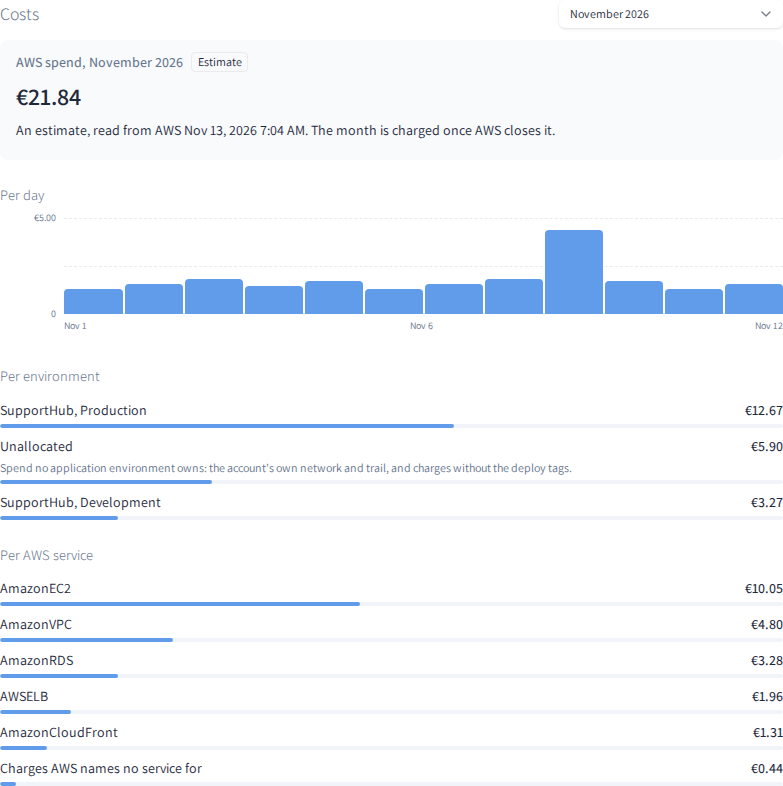
The section shows:
- the month picker, newest month first, each month with its state: Estimate, Not charged yet, Charged, Invoiced, Nothing to charge or Held, and for the current month also Not read yet or No costs;
- the month's AWS spend, marked Estimate or Statement, with what it is: an estimate says when its figures were read from AWS; a statement taken from your balance says when it was charged, and one on your invoice says when it was added to your invoice;
- the line it was priced from: the usage at AWS public on-demand prices in US dollars, and at what AWS charged for usage it publishes no price for, the markup as a percentage, and the exchange rate with its date and source;
- Per day, a bar for each day of the month, with its amount when you point at it;
- Per environment, the month for each application environment and Unallocated, largest first;
- Per AWS service, the month for each AWS service by its name in AWS, such as AmazonEC2, and Charges AWS names no service for.
The days, the environments and the services each add up to the month's amount.
Seeing what an account costs
To see what an account costs
- Go to Settings > Cloud accounts and choose the account.
- Scroll to Costs. It opens on the current month, or on the month the email or inbox notice you followed is about.
- To see another month, choose it in the month picker.
How a month is charged
Once AWS closes a month, Productmind makes the month's statement for each account it manages and charges it once, in the way your organization pays:
- From your Pay-as-you-go balance. The statement is taken from your balance within minutes, even if it takes the balance below zero; work that needs the balance then waits for a top-up. It shows on Usage, in the Cloud section under AWS spend.
- On your invoice. The statement is a line of your next invoice, AWS spend, excluding VAT. A discount code never reduces it. Until the invoice is made, it is in Other charges on Usage.
Your organization's billing admins and billing contacts get an email about each month that is charged: when it is taken from your balance or, if your organization pays by invoice, once its statement is made, saying it is on your next invoice. Billing admins also get an inbox notice, which opens the account's page, its Costs section on that month, or the accounts list when the month covers several accounts. A month with no AWS spend is Nothing to charge: it is never charged. Any spend, however small, is rounded up to at least a cent and charged.
How costs behave
The figures move about once a day. Productmind reads each account's costs from AWS once a day, early in the morning (UTC), so the section doesn't refresh on its own while it is open.
A statement is rounded up once. The month's amount is rounded up to the cent once, on the whole month; its days, environments and services are shares of that amount.
A month already made keeps its markup. A change to your plan's markup prices the months made after it. An estimate uses your plan's markup now.
A corrected month says so. Productmind may correct a month's statement and make it again. If it was already taken from your balance, its amount is given back to your balance, and the corrected month is charged as its own statement; the email says what the new amount replaces. On Usage, the billing period it was taken in shows it as Voided, given back, counted for nothing; if it was taken in an earlier billing period, the period it is given back in shows it as Given back, also counted for nothing.
A held month isn't charged for now. If AWS's figures for a month need a review, the month shows Held with no amount, and nothing is charged for it until the review is done. A month of an account handed over to your company shows Held too: it isn't charged here.
Environments come from deploy tags. A month is split by application environment from the tags your environments' deploys put on what they create. Until AWS reports those tags, the whole month is Unallocated.
An account your company connected costs nothing here. Its Costs section has one line: AWS bills your company directly for this account.
Permissions
| To | You need |
|---|---|
| See an account's Costs section | The Owner or Admin role |
| See an application's name in a month's environments | Also, permission to open the application |
| See the AWS spend on Usage | The Owner or Admin role |
Troubleshooting
"Not read from AWS yet: Productmind reads each account's costs once a day."
The month has no figures yet: a new account, or a month that has just started. Check again the next day.
"No AWS spend recorded for this month."
AWS reported no usage of the account for the month.
"AWS's figures for this month need a review; nothing has been charged for it yet."
AWS's figures for the month need a review before the month can be charged. Productmind is told and looks into it. Nothing is charged meanwhile.
"Cloud costs are being set up after an update. Try again in a few minutes."
Productmind is being updated. Choose Try again after a few minutes.