

Cloud account spend caps
Each AWS account Productmind manages for your workspace has a spend cap: the most it may spend on AWS in a month, in euros. The Spend cap section on the account's page, under Settings > Cloud accounts, shows the cap, where its limit comes from and this month's spend against it. At the cap, Productmind freezes the account: what runs in it keeps serving, but nothing new can be deployed, created or started until its spend is under the cap again.
AWS bills your company directly for an account your company connected itself, so it has no spend cap and no Spend cap section.
Cloud account spend caps are part of Cloud accounts, which is in early access, and is being turned on for a few organizations first.
Key concepts
Spend. What an account costs your organization in a month: the larger of two readings of its AWS usage, each priced as its Costs section prices it (AWS public prices plus your plan's markup, in euros, excluding VAT). One is the Costs section's own, read once a day. The other is AWS's own running total for the account (AWS Budgets), which AWS refreshes a few times a day. What is charged at month end is the Costs section's statement. See Cloud account costs.
Limit. The most an account's cap can be. It is the first of these that is set:
- a limit Productmind set for this account;
- a limit Productmind set for your organization, for the account's tier;
- your plan's value for the account's tier;
- Productmind's standard limit for the tier.
Cap. The account's limit, or a lower cap an Owner or Admin set for the account. A cap of its own is at least 1 euro and at most the limit.
Warning. At 80% of the cap, your organization's Owners and Admins are told, once a month.
Frozen. At or over the cap, Productmind holds the account: it is frozen over its spend cap. What runs in it keeps serving and costing, and scales with its traffic, but nothing new can be deployed, created or started in it, and its environments' deploys and destroys wait until the hold lifts.
The Spend cap section at a glance
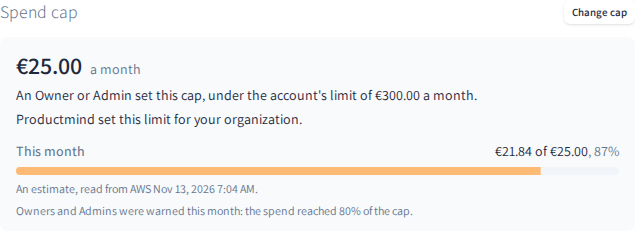
The section shows:
- the cap a month, and where its limit comes from: Your plan allows up to the plan's value a month, Productmind set this limit for your organization, Productmind set this limit for this account, or Productmind's standard limit for the account's tier. A cap an Owner or Admin set says so, beside the limit;
- This month: the month's spend against the cap, and when it was read from AWS. An estimate says it is one. AWS's running total says Read from AWS Budgets: it can be higher than the Costs section's figure until that section's next daily read. Before the month's first read, it says Not read from AWS yet;
- a bar of the spend against the cap, amber from the warning and red at the cap, and the spend the warning comes at, or that this month's warning was sent. A limit of 0 has no bar: it keeps the account frozen until Productmind changes it;
- while the account is frozen, since when, and how the hold lifts;
- What Productmind limited: anything Productmind limited in the account to stop its spend, and since when.
The account's page also says Frozen: over its spend cap at the top while the account is frozen, and so does its row in the list. An account being deleted says Deleting there instead, and its page adds that it is also frozen over its spend cap.
Changing the cap
To change an account's spend cap
- Go to Settings > Cloud accounts and choose the account.
- In Spend cap, choose Change cap.
- Choose A cap of its own and enter the cap in euros, or choose Follow the limit.
- Choose Save cap.
The section says what the change did. A cap at or under this month's spend freezes the account at once: before you save, the dialog says This freezes the account now, and its button reads Save and freeze. On a frozen account, a cap over this month's spend lifts the hold at once when the month's spend was read recently, and deploys resume within a few minutes; otherwise the cap is saved, and the section says why the account stays frozen.
For a higher limit than the account's, ask Productmind.
How spend caps behave
Every account is capped from the start. An account Productmind manages has a cap from the moment it is created, at its limit until an Owner or Admin sets a lower cap.
Productmind checks every hour. Productmind compares each account's spend for the month with its cap every hour. AWS reports an account's usage hours after it happens, a few times a day at most, so an account can spend past its cap before it is frozen.
Frozen stops new work, not spend. Nothing new is deployed, created or started, but what already runs keeps serving and costing, and scales with its traffic: its functions, its database, the traffic they serve and the account's network. You can still stop an environment deploying to the account, and delete the account.
A month is charged in full. Spend past the cap is charged at month end, as all of a month's spend is. See How a month is charged.
A hold lifts once the spend is under the cap. When the cap or its limit is raised over this month's spend, or early next month, once Productmind has read the new month's spend, if it is under the cap then. A limit of 0 keeps the account frozen until Productmind changes it.
Deploys resume by themselves. While the account is frozen, its environments show Paused: nothing deploys while the account is over its spend cap. Once the hold lifts, deploys resume within a few minutes, unless the account is frozen for another reason, such as its deletion.
A frozen account being deleted stays frozen. Cancelling the deletion of a frozen account leaves it frozen until this month's spend is under its cap.
Owners and Admins are told. At the warning and at the hold, your organization's Owners and Admins get an email and an inbox notice; when the hold lifts, an inbox notice. None is sent while your organization's deletion is scheduled.
Productmind may limit what runs. If a frozen account's spend keeps growing, Productmind may limit resources in it, such as a function's concurrency or a database. What Productmind limited lists each one until Productmind restores it. Ask Productmind about any of them. Each time, Productmind records it first: see Cloud account Productmind access.
Each change is recorded. A change to the account's cap or to a limit Productmind set for the account, a hold and a lift are recorded in the audit log with who made them, and show in the account's History. A hold or a lift Productmind makes on its own is recorded as System.
Permissions
| To | You need |
|---|---|
| See an account's Spend cap section | The Owner or Admin role |
| Change an account's cap | The Owner or Admin role, signed in to Productmind yourself |
Troubleshooting
There is no Spend cap section
The account is one your company connected itself, which AWS bills directly, Productmind hasn't created it in AWS yet, or it is being closed or is closed.
There is no Change cap button
Your role isn't Owner or Admin, or the account's limit is under 1 euro, which only Productmind changes.
"At most EUR 300.00, the account's limit. For a higher limit, ask Productmind."
The cap you entered is over the account's limit. Enter a cap up to the limit, or ask Productmind for a higher one.
"The most this account's cap can be is EUR 300.00 a month. Ask Productmind for a higher limit."
The account's limit changed while the dialog was open, and the cap is over the new one. The dialog now shows the new limit: enter a cap up to it, or ask Productmind for a higher one.
"This month's spend has not been read yet."
The cap is saved, and the account stays frozen until Productmind reads the month's spend, early in the month: the hold lifts then if the spend is under the cap.
"... this month's spend was last read at ..., too long ago to lift the hold on."
The cap is saved, but the month's spend was read too long ago for the hold to lift on it. The hold lifts at the next fresh read, usually within a day, if the spend is under the cap then.
"... AWS's latest report of this month's spend left this account out ..."
The cap is saved, but AWS's latest report did not include this account. The hold stays until a report includes it and the spend is under the cap then.
"Spend caps are being set up after an update. Try again in a few minutes."
Productmind was updated while the dialog was open. Try again after a few minutes.