

Cloud account Productmind access
Productmind's automation sets up and runs the AWS accounts it manages for your workspace. Rarely, a Productmind person must act inside one: to stop its spend, recover a stuck stack, act on an abuse report or fix a problem. Each time, Productmind records why and for how long before it starts, and tells your organization's Owners and Admins. The Productmind access section on the account's page, under Settings > Cloud accounts, lists each time, with what it changed or, for a root task, its root sessions.
No Productmind person ever signs in to an account your company connected itself (Productmind holds no emergency access or root task there), so such an account has no Productmind access section.
Cloud account Productmind access is part of Cloud accounts, which is in early access, and is being turned on for a few organizations first.
Key concepts
Emergency access. A Productmind person signs in to the account with administrator rights, for a limited window, to do what the reason says.
Root task. A Productmind person does one or more named tasks as the account's root user, for a limited window: unlock a bucket policy, unlock a queue policy, check the root user's credentials, or remove the root user's credentials. Each task runs in a root session of its own.
Window. The time an access may start and run in, set before it starts: at most 8 hours, which Productmind may lengthen to at most 24 hours from the window's start.
Who. The role of the person who acts: a Productmind engineer, Productmind support or Productmind security. Productmind never names the person.
States. An access is:
| State | What it means |
|---|---|
| Planned | Recorded, not started yet. It may start until its window ends. |
| No start recorded | No start was recorded before its window ended. Productmind may still record one made within it, until the access expires a day later. |
| In progress | Started, and inside its window. |
| Past its window | Still in progress after its window ended: Productmind is ending it. |
| Ended | Finished. Its changes are listed, or a root task's root sessions. |
| Called off | Cancelled before it started: nothing was done. |
| Expired | It was never recorded as started, and was closed a day after its window ended. |
The Productmind access section at a glance
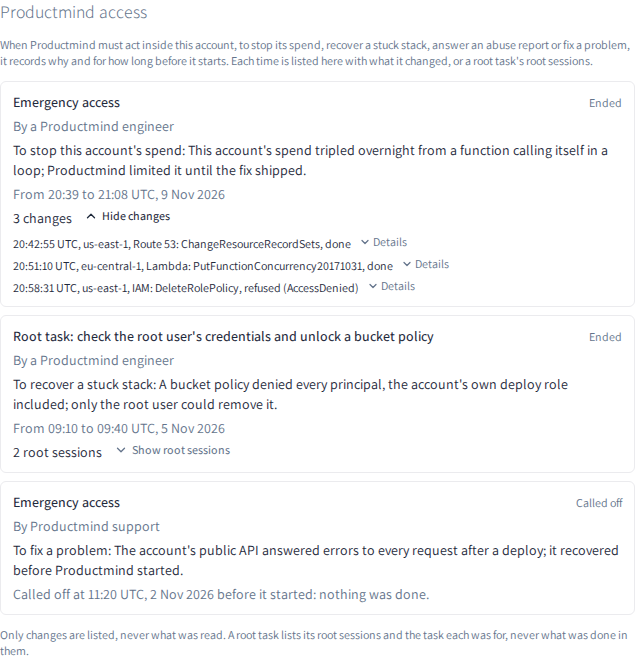
The section lists each access, newest first. Each one shows:
- what it was: Emergency access, or Root task: and its tasks;
- who acted, in their role's words, such as By a Productmind engineer;
- why: the purpose, such as To stop this account's spend, and the reason Productmind wrote for you;
- when, in UTC: Planned: may start until 21:39 UTC, In progress since 20:39 UTC, until 21:39 UTC, From 20:39 to 21:08 UTC, 9 Nov 2026 once it ended, or Called off at 20:52 UTC before it started: nothing was done;
- once it ended, what it changed: 2 changes, or No changes. Choose Show changes to list each change with its time, its AWS Region, the service and the call, and whether it was done or refused by AWS, with AWS's error. Choose Details under a change to see what the call asked for. A root task lists its root sessions instead: choose Show root sessions.
An emergency access lists only its changes, never what was read. A root task lists its root sessions and the task each was for, never what was done in them.
How Productmind access behaves
It is recorded before it starts. Productmind records why, who in their role's words, and the window before anyone acts in the account. An access can't start after its window ends.
Your Owners and Admins are told. Each of your organization's Owners and Admins gets:
- when an access is recorded, an email and an inbox notice: Productmind may act in the AWS account, until when, and why;
- when it ends, an email and an inbox notice with when it ended and how many changes it made (a root task's root sessions);
- when it is called off, an inbox notice: nothing was done;
- when it expires, an inbox notice: it was never recorded as started, and was closed a day after its window ended.
Nothing is sent when Productmind changes an access's window. The notices are sent even while your organization's deletion is scheduled.
A security investigation can delay the telling. To protect a security investigation, Productmind may tell you later: at most 30 days after the access's window ends. You are then told, and the section lists it, as above. An access that ended before you were told gets one notice: that it ended, with when it started, or that it was called off or expired.
Each access is recorded in the account's History. When you are told, the account's History shows a Productmind access event, recorded as System, at the time you were told. See Cloud accounts.
What Productmind limited shows in Spend cap. Anything Productmind limits in the account to stop its spend also shows under What Productmind limited in the account's Spend cap section. See Cloud account spend caps.
Permissions
| To | You need |
|---|---|
| See an account's Productmind access section | The Owner or Admin role |
| Get the emails and inbox notices of Productmind access | The Owner or Admin role |
Troubleshooting
There is no Productmind access section
The account is one your company connected itself, where no Productmind person ever signs in, or your role isn't Owner or Admin.
"Productmind's access to this account could not be read."
The section could not be loaded; the reason it was given shows under this line. Choose Try again.
An access says "Past its window"
Its window ended while it was still in progress. Productmind is ending it: once it has, the access shows Ended with its changes, and your Owners and Admins are told.