

Stack settings
An environment that deploys to a cloud account has stack settings: the settings its app takes when it deploys, such as how much memory its API has, whether its documentation site is published, the plain values its API reads, and its API secrets, the keys its API reads by name, such as a payment provider's. You change them from the application's Source code tab, and a change applies at the environment's next deploy.
Stack settings are part of Cloud accounts, which is in early access. An environment has them while it deploys to a cloud account, and its application's repository declares which there are.
Key concepts
Stack settings. The settings an environment's app takes when it deploys. The application's repository declares which settings there are, each environment has values of its own, and a setting you leave unset uses the application's default. A secret setting, such as a password, is never shown once saved.
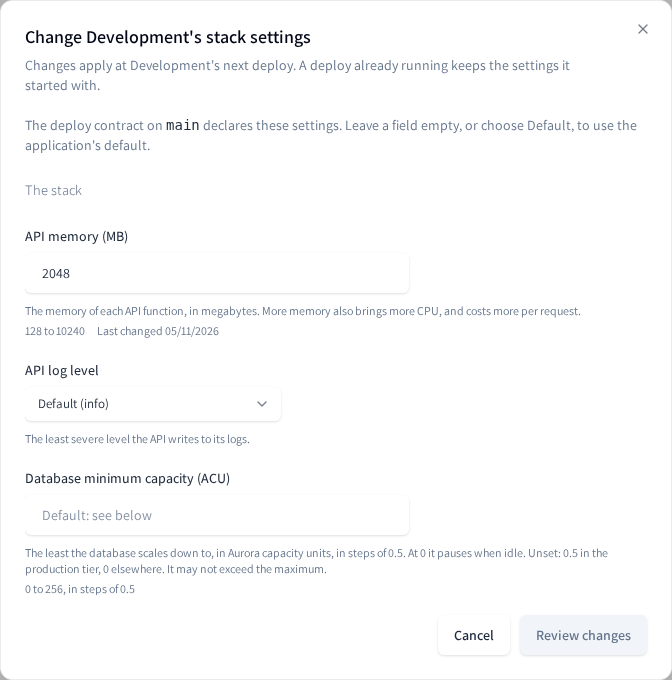
Sections. The dialog shows the settings in up to four parts: The stack (the stack's own settings, such as its memory, its database's capacity and its demo data), API variables (plain values the application's API reads, shown as they are held), App variables (values built into the app, which anyone using it can read) and API secrets.
Host names. When the application's repository declares them, the stack's settings include the names of the environment's hosts under its domain, and whether the app is served at the domain itself. See Domains.
API secrets. Values the application's API reads by a name you give it, such as
STRIPE_SECRET_KEY: a payment provider's key, a token for a service it calls. A value is kept
encrypted, in the repository's environment and in the environment's cloud account, and is never shown
again. A name is not secret: the deploy prints it, so never put anything sensitive in a name.
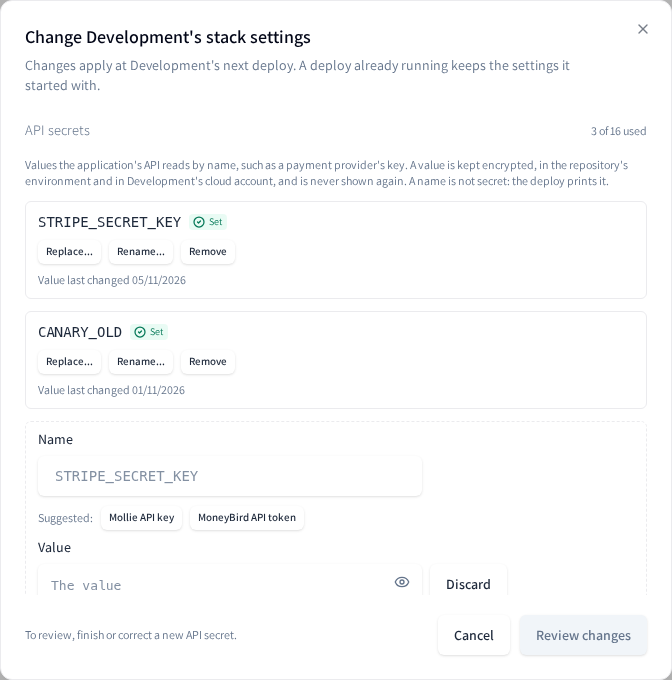
Slots. The repository declares how many API secrets an environment can hold, for example 16, and the dialog shows how many are used, for example 3 of 16 used. The API secrets section shows only once the application's repository declares them: an application whose repository declares none, such as one created from an older copy of Productmind's template, shows no API secrets until its repository is updated.
Suggested names. The names the application's code reads, which the repository suggests, such as
Stripe secret key for STRIPE_SECRET_KEY. Choosing one fills in the exact name: a name typed
with a mistake is a key the app never reads.
To change an environment's stack settings
-
Open the application and choose Source code.
-
Under Cloud accounts, choose the ... on the environment's row, then Stack settings.... Productmind reads the settings from the repository, which can take a few seconds.
-
Change the settings you need. Leave a field empty, or choose Default, to use the application's default. A value its rule refuses says why under its field, and you can't review until you correct it.
-
For a secret setting, choose Set or Replace, then enter the new value. It is masked as you type; Show value shows it. To take a secret away, choose Remove; Undo puts it back before you save.
-
Choose Review changes. Each change is listed with its old and new value (a secret only as set, replaced or removed), and a setting going back to its default says what applies then. For a production environment, a reminder that the change applies at its next deploy comes first.
-
Choose Save.
Saving can take up to half a minute. Saved appears, with when the changes apply: at the environment's next deploy, the next pull request merged into its branch, Deploy now or Retry deploy. When the save changed something while the environment is Active, the dialog then offers Deploy now, which starts a deploy of the branch with your changes, waiting while another deploy runs (see Deploys); Close leaves them for the next deploy. A deploy already running keeps the settings it started with, and a paused environment's apply once it deploys again. The environment must be Active, Paused, Resuming, Changing branch or Updating, or have failed while being set up, changing branch or following a renamed repository. While a destroy is scheduled, under way, restoring or failed, Stack settings... isn't offered and its settings can't be read or changed; once the environment is Destroyed they can, and apply at Deploy again. See Destroying an environment.
If only some changes are saved, the dialog says how many, and each other change says why it wasn't saved. A setting's change is kept: choose Try again to save those settings as you reviewed them. An API secret's change, a removal of what nothing reads, and a change you make after that are saved with Review changes, never with Try again. If a save stopped part way through an API secret, the dialog says what was written, for example a value written to a slot with no name, which is then listed for removal.
A value set earlier that breaks its own setting's rule is shown under that setting, so you can correct it before the next deploy fails on it. Only the deploy checks the rest: a secret's value, a value under a pattern that Productmind can't check, or that is longer than 256 characters, and the rules between settings, such as a minimum capacity above the maximum, or demo data turned on with no demo password.
Productmind never shows a secret again once it is saved, and GitHub never returns it. But the deploy reads it to set up the app, so any code on the environment's branch that the deploy runs can reach it. Review changes to the deploy's code before they are merged into that branch.
API secrets
An application created from Productmind's template reads its payment providers' keys, and any other key its code reads by name, from its API secrets. Each one is a name the application's API reads and a value, written to the environment and applied at its next deploy.
To add an API secret
- Open the environment's Stack settings, as above.
- Under API secrets, choose Add secret.
- Under Name, choose one of the suggested names, or enter the name the application's code reads: 2 to 64 capital letters, digits and underscores, starting with a letter.
- Under Value, enter or paste the value. A suggested name says what is expected, and a value that doesn't look like one, such as a publishable key in a secret key's place, is refused under its field. Enter goes on as in any other field; for a value that spans lines, such as a private key, press Shift+Enter between its lines.
- Choose Review changes, then Save.
The name shows Set with the date its value was saved. Each API secret takes a slot: once every slot is used, remove one and save before you add another.
To replace, rename or remove an API secret
- Open the environment's Stack settings, and find the name under API secrets.
- Choose one:
- Replace to enter a new value under the same name;
- Rename to give it a new name: enter the new name, then its value again, which Productmind never shows. A rename needs a free slot: the new name takes one, and the old name's slot is free once the rename is saved;
- Remove to take it away; Undo puts it back before you save.
- Choose Review changes, then Save.
A removed name is no longer applied from the next deploy, and its value is deleted from the repository's environment.
To remove what nothing reads
The repository's environment can hold entries no deploy applies: a value whose name was never saved,
an empty name, a plain copy of a value (which makes the deploy fail), a slot past the ones the
repository declares, or a setting the repository no longer declares. The dialog
lists them by their own names, such as SETTING_API_SECRET_03, with what each is: under API
secrets for the slots, at the end for the rest.
- Open the environment's Stack settings.
- Choose Remove beside each entry you no longer need; Undo keeps it.
- Choose Review changes, then Save.
Productmind removes such an entry and never sets one. While the environment changes branch, they can't be removed: the previous branch's deploy may still read them.
How stack settings behave
A change applies at the next deploy. Saving writes to the repository's environment; the app takes the change at its next deploy: the next pull request merged into the environment's branch, a Deploy now or a Retry deploy.
A value is never shown again. Neither a secret setting's value nor an API secret's is shown once saved, and GitHub never returns one. The dialog shows Set or Not set and when it last changed.
A name with no value is skipped. An API secret whose value was never saved shows Not set: the deploy skips it until you set one.
Some names are refused. An API secret can't take a name AWS or the runtime reserves (names
starting with AWS_, LAMBDA_, LD_, BUN_, NODE_ or SSL_CERT_, and the runtime's own, such
as PATH, TZ, PORT or HTTPS_PROXY), a name the stack sets itself, such as DATABASE_URL, or
the name of a variable one of the API variables sets. The dialog says why under the name before you
review.
Use the narrowest key. Where a provider offers restricted keys, such as Stripe's keys starting
rk_, use one with only the access the app needs. If you doubt a key, remove it here and roll it at
the provider.
A long value under a rule can't be set here. A setting whose value must match a pattern, such as an email address, takes at most 256 characters in Stack settings: Productmind checks each value against its pattern before it saves it, and refuses one too long to check.
A setting whose rule Productmind can't check is read-only. When the repository declares a pattern for a setting that Productmind can't check safely, Stack settings shows the setting's value but doesn't let you change it, or clear it, until the repository's pattern changes.
Detaching keeps them. When an environment stops deploying to an account, its stack settings and API secrets stay in the repository's environment and apply again if it deploys to an account again. Once it is detached, Productmind can no longer change or remove them there, so remove any you don't want kept before you detach. See Cloud accounts.
Each change is recorded. Each save that changes an environment's stack settings is recorded in the audit log as Stack settings changed, not in the account's History: a number, an on or off setting or a choice with its old and new value, a text setting or a secret only as written or removed, an API secret by its name only as written or removed, and an entry nothing reads as removed. A secret's value is never recorded, nor an API secret's. A save that changes nothing is not recorded. See Audit log.
Permissions
| To | You need |
|---|---|
| See an environment's stack settings and API secrets' names | The Owner or Admin role, signed in to Productmind yourself |
| Change an environment's stack settings, add, replace, rename or remove an API secret, and remove what nothing reads | The Owner or Admin role, signed in to Productmind yourself |
Limits
- One save takes at most 64 changes. A rename counts twice: the new name's add and the old name's removal.
- An API secret's value takes at most 4,096 bytes, and a setting's value at most 48 KB.
- An API secret's value can't be only spaces or line breaks, or hold
{{followed later by}}, which AWS refuses in a secret's value. - A secret's value, an API secret's or a secret setting's, can't begin or end with a space or a line break: nothing trims it, so the app would read the extra character. A line break inside a value is kept.
- Together, the API secrets and every setting beside them take at most 120 KB as the deploy passes them on. Quotes and backslashes in an API secret's value count four bytes each, and other special characters more; 16 values of 4,096 plain characters fit beside a usual configuration. Past it, the next deploy fails at its "The settings" step until values are shortened or removed.
- An environment holds as many API secrets as its repository declares slots for.
- A setting's value under a pattern takes at most 256 characters in Stack settings.
Troubleshooting
"The deploy contract on main changed since these settings were read"
The repository's deploy contract, which declares the settings, changed after you opened Stack settings, so nothing was saved. Choose Review again: your changes are kept where the setting still exists. Check them, then save.
"Some of these stack settings changed since they were read"
Someone changed a setting or an API secret you changed, after you opened Stack settings, so nothing was saved. Choose Review again: your change stays in its field, and Review changes shows the value now held beside it. Save if you still want your change.
"GitHub didn't say when some of these stack settings last changed"
GitHub holds a setting you changed without the date it last changed, so Productmind can't tell whether someone changed it after you opened Stack settings, and saves nothing rather than overwrite it. Reading the settings again doesn't help. To save your other changes, leave that setting as it is, and contact Productmind support about it.
"Productmind is changing this repository's deploy settings right now"
Someone is saving the stack settings of an environment of this application, whose environments share its repository, or Productmind is updating the repository's deploy settings, for example during a branch change. Nothing was saved. Wait a minute, then choose Save again.
"Development's deploy protection on its repository isn't in place"
The environment's protection on the repository, which lets only its own branch's deploys read its settings and secrets, isn't in place, and Productmind saves nothing until it is. Nothing was saved. If the environment shows Failed, choose Try again on its row: that restores the protection. Otherwise Productmind puts it back within the hour; save again then.
"STRIPE_SECRET_KEY is an API secret already"
An environment holds a name once. To change its value, choose Replace on it. To add it again under a new value, remove it and save first.
"DATABASE_URL is a variable the stack sets itself"
The stack sets that variable for the app, so an API secret can't take its name. The same applies to a
name that starts with AWS_ or another prefix AWS or the runtime reserves, and to the name of a
variable an API variable sets. Use the name the application's code reads for the key.
"Stripe secret key does not match its pattern"
The value doesn't look like what the suggested name expects, for example a publishable key typed where a secret key goes. Check that you copied the right key from the provider.
"All 16 slots are in use"
Every slot holds an API secret, or something nothing reads. Remove one you no longer need, or an entry nothing reads, save, then add or rename again.
An API secret shows "It has no value yet, so the deploy skips it"
Its name is held without a value, for example when its value was deleted on GitHub. Choose Set and enter its value, or remove it.
"These can't be removed while Development changes branch"
The environment is moving to another branch, and the previous branch's deploy may still read what the new branch's repository doesn't declare. Wait until the environment shows Active, then remove them.
"shop.example.com has a CNAME record at web, where this would put the app"
A host label you chose is a name one of your DNS records holds, on a domain you own for this environment: the one it deploys under, the one a change moves it to, or one it can move back to. Nothing was changed. Delete or move that record under DNS records, then save again. When the message says the domain's records can't be edited now, remove that domain under Domains you own if no environment uses it, or choose another label.
"This would put the API at ..., another of your organization's domains"
A host label you chose would put the host on another domain your organization uses for an environment,
such as the API at api.shop.example.com when that is another environment's domain, or on the NS
records Productmind keeps there for one. That domain's own zone would hide the host. Nothing was changed.
Choose another label, or move that environment to another domain first. The words name the other
domain when it is used in this workspace.