

Domains
An application's environment that deploys to a
cloud account serves its app, API,
websocket and docs hosts under a domain: Productmind's address, or a domain your company owns,
such as shop.example.com. With a domain you own, Productmind makes a DNS zone for it in the
environment's AWS account, you point the domain at the zone's name servers, and the environment
deploys there once public DNS does.
Domains are part of Cloud accounts, which is in early access. An environment chooses its domain when it is attached to an account, and an environment that deploys can change it later: see Changing domains.
Key concepts
Productmind's address. A name under Productmind's own domain, kept for the environment and ready while you attach. It serves accounts Productmind manages, for organizations it is available to.
A domain you own. A domain or subdomain your company registered, such as shop.example.com. The
environment's hosts live under it: app.shop.example.com, api.shop.example.com,
ws.shop.example.com and docs.shop.example.com. Your own AWS account always deploys under a domain
you own.
Subdomain and whole domain. A subdomain, such as shop.example.com under example.com, is the
easiest: you add four NS records where example.com's DNS is served, and its other records stay where
they are. A whole domain, such as example.com itself, moves all of its DNS to the zone, and is
pointed at its registrar: see Whole domains.
DNS zone. Where the domain's DNS records live once it points there: a public Route 53 hosted zone in the environment's AWS account. Productmind makes it, and the stack writes the app's records into it. If your own AWS account already has a public zone for the domain, and the domain already points at it, Productmind uses that zone instead, and never changes or deletes it. It must be the account's only public zone for the domain.
Name servers. The four servers Route 53 gives the zone. Pointing the domain at them is what makes it the environment's: Productmind checks public DNS until it sees them, and nothing deploys before.
An environment's domain, on its row under Cloud accounts, shows one of:
| State | What it means |
|---|---|
| Making its DNS zone | Productmind is preparing the account and the zone. Its name servers show under DNS records once the zone is made, or, for a whole domain on an account Productmind manages, once you have copied and confirmed its records |
| Copy your DNS records | A whole domain on an account Productmind manages: copy its records into Productmind and confirm them. See Whole domains |
| Waiting for your DNS | The zone is made, and the domain doesn't point at its name servers yet: the next step is yours. The row's status says it, with what the last check found |
| Setting up its DNS | Productmind is still setting the domain up, such as confirming that no other environment uses it, or adding its NS records to the zone of the domain above it |
| Points here | Public DNS points the domain at the zone. The environment goes on to Active |
| No longer points here | The domain stopped pointing at the zone after it did. The app keeps deploying, but nobody reaches it under the domain until you point it back |
Only Owners and Admins see Making its DNS zone and Waiting for your DNS, and what the last check found. Anyone else sees Setting up its DNS until the domain points there.
The Domain choice at a glance
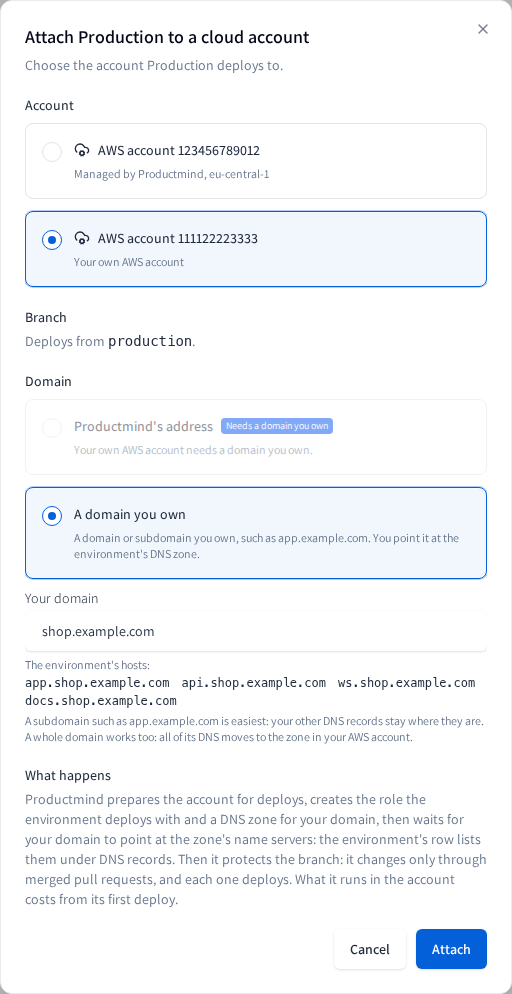
When you attach an environment, Domain offers two cards:
- Productmind's address, when the account can take it. On your own AWS account it shows Needs a domain you own, and for an organization it isn't available to yet, Not available yet.
- A domain you own, with a field for it. As you type, it lists the hosts the environment gets, or says why the name can't be used. On an account Productmind manages, a whole domain's records are copied into Productmind first, which it says too.
Deploying under a domain you own
To attach an environment under a domain you own
- Open the application and choose Source code.
- Under Cloud accounts, choose Attach on the environment's row.
- Under Account, choose the account. Choosing your own AWS account selects A domain you own.
- Under Domain, choose A domain you own, and enter the domain, for example
shop.example.com. - Choose Attach.
The row shows Making its DNS zone, then Waiting for your DNS with DNS records beside the domain. A whole domain on an account Productmind manages shows Copy your DNS records between the two, until you copy and confirm its records. Point the domain at the zone, as below. Once public DNS points it there, the row shows Points here, and the environment goes on to Active.
If Productmind refuses the domain, the dialog says why, and you can enter another. See Troubleshooting. A refusal about how many domains an environment holds is on Changing domains.
Pointing your domain at the zone
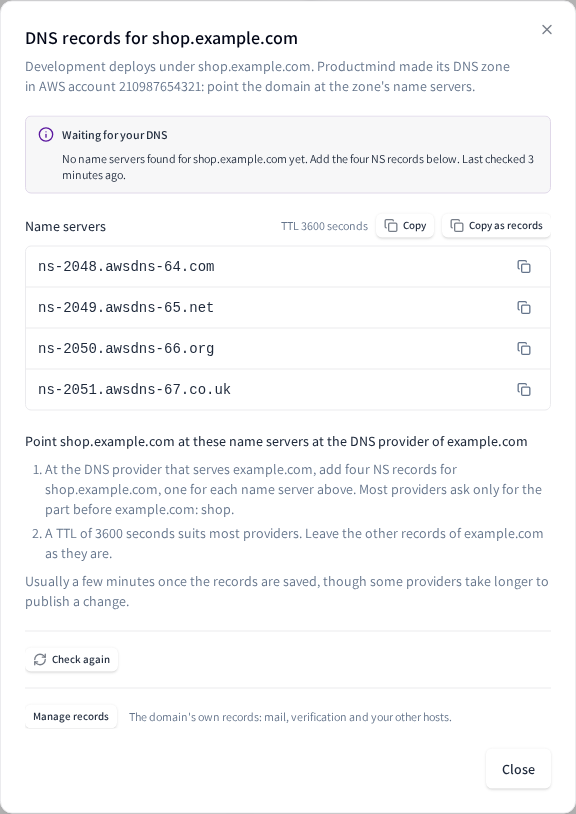
On the environment's row, choose DNS records. The dialog shows what the last check found and when, and the zone's four name servers, each with a copy button. Copy copies all four, one a line, as most DNS providers' forms take them; for a subdomain, the TTL to give them shows beside it, and Copy as records copies them as zone-file lines instead, for a provider that imports a zone file, each name in full with its final dot:
Code
Below them are the steps for your domain, then Check again while Productmind waits for it. DNS records stays on the row once the domain points there, so you can read the name servers again. On an account Productmind manages, Manage records opens the domain's own records, such as its mail: see DNS records.
To point a subdomain at the zone
- Choose Copy, or Copy as records if your provider imports a zone file.
- At the DNS provider that serves your registered domain (
example.com, forshop.example.comand forqa.eu.example.comalike), add four NS records for your subdomain, one for each name server. Most providers ask only for the part before the domain they serve:shop, orqa.eu. DNS records names it for your domain. - Use a TTL of 3600 seconds, unless your provider asks for another.
If your provider serves a zone below your registered domain, such as eu.example.com, add the records
there instead, named by the part before that zone's name (qa). Leave the zone's other records as they
are. The change usually takes effect within a few minutes.
When the domain above is on an account Productmind manages
A domain can sit under another domain your organization uses for an environment, such as
shop.example.com under example.com. When the outer domain's zone is one Productmind made in an AWS
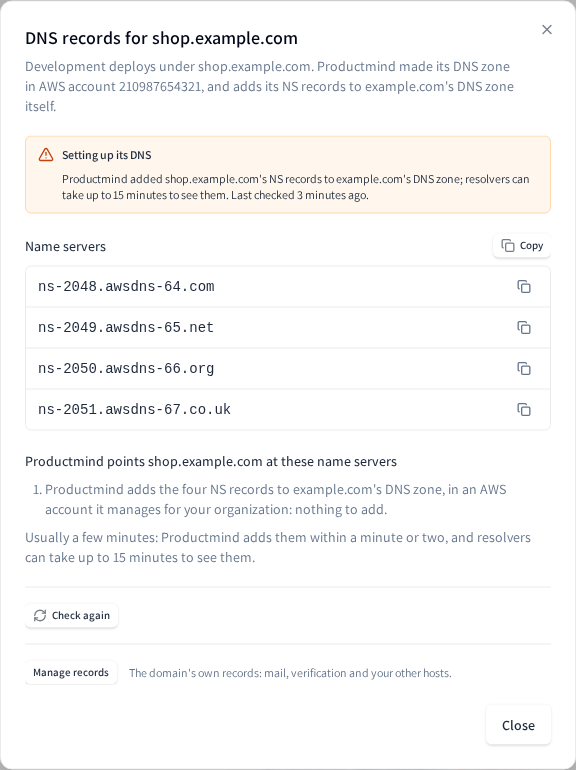
account it manages, Productmind adds the inner domain's four NS records to that zone itself, as soon as
the inner domain's zone is made, whichever kind of account the inner domain is on: there is nothing to
add. DNS records says so, and the row shows Setting up its DNS until public DNS points the
domain at its zone, usually within a few minutes. The outer domain's records list them under
Productmind's records.
- While the outer domain doesn't point at its own zone yet, such as a whole domain whose records you are still copying, add the same four NS records where its DNS is served now too: DNS records says so, with Copy as records.
- If the outer domain's zone isn't made yet, Productmind adds them once it is. Meanwhile the outer domain doesn't point at a zone of its own either, so add the same four where its DNS is served now, as DNS records says.
- If the account that holds the outer domain's zone is paused or being deleted, nothing new is written there: Productmind adds them once it takes changes again.
- If the inner domain's zone is in your own AWS account and holds a domain of its own below it, such
as
eu.shop.example.com, Productmind points the inner domain at its zone only once that zone holds the deeper domain's NS records: DNS records lists them, four for each domain, to add there first. Most providers ask only for the part of each name before the zone's, such aseu. Until you add them, the reminder emails list them too. - If a domain between the inner domain and a deeper one still has no zone, Productmind points the inner domain at its zone once that zone is set up, so the deeper domain keeps resolving meanwhile: DNS records names the domain it waits for. Where it asks you to add the same NS records where the outer domain's DNS is served now, wait for that zone too.
- If the outer domain is used in another workspace of your organization, DNS records and the emails don't name it: they say the domain above it, which another workspace of your organization uses.
When you remove the inner domain, Productmind removes its NS records from the outer zone; when the inner domain moves to another zone, Productmind replaces them with that zone's servers. Before the outer domain's DNS moves elsewhere, add the NS records Productmind keeps there for your other domains where it moves: its export lists them (see DNS records).
To point a domain at another environment's zone in your own account
When a domain sits under another domain your organization uses for an environment, such as
dev.shop.example.com under shop.example.com, and that outer domain's zone is in your own AWS
account, its NS records go in the outer zone, which you write yourself:
- Sign in to the AWS console of the account that holds the outer domain's zone, and open Route 53, then Hosted zones.
- Choose the public zone for
shop.example.com. - Choose Create record. Enter
devas the record name, choose NS as the record type, and paste the four name servers from the inner domain's DNS records, one a line. - Choose Create records.
The inner domain points at its environment once the change takes effect, usually within a few minutes. If you later point the outer domain at another zone, copy the inner domain's NS records into that zone first: until they are there, the inner domain stops resolving. When Productmind deletes a zone it made in your account, the records you added to it go with it.
A whole domain is pointed at its registrar once its records are in the zone: see Whole domains.
To check again now
Productmind checks public DNS on its own: every 2 minutes for the first half hour, every 10 minutes until 6 hours have passed, then every hour.
- On the environment's row, choose DNS records.
- Choose Check again.
Productmind checks public DNS again within a minute appears, and the dialog shows what it finds. Check again then waits a minute, even if you close the dialog and open it again.
What a check finds
While the environment waits, DNS records says what the last check found, as below; the row says the same, pointing to DNS records for the name servers. The other name servers it names are the ones that aren't the zone's four.
| It says | What it means, and what to do |
|---|---|
| Productmind is checking public DNS for shop.example.com | No check has answered yet. Wait a minute |
| No name servers found for shop.example.com yet | Public DNS names no name servers for the domain. Add the four NS records, or wait while a change you made spreads |
| shop.example.com points at other name servers | The domain still points at the servers it had. Replace them with the zone's four |
| shop.example.com's current DNS zone already has the four below as its NS records, but public DNS still answers with its old name servers | The NS records were changed inside the domain's own zone, which moves nothing, or a change where the domain is pointed isn't published yet. Replace the NS records where the domain above it is served, or, for a whole domain, the name servers at its registrar. A change already made there shows once it is published |
| shop.example.com lists other name servers beside these four | The domain points at the zone's servers and at others. Remove the others |
| Public DNS can't validate shop.example.com | Validating resolvers fail for the domain while the zone answers: a DS record left behind looks like this. See Troubleshooting for where it sits |
| Public DNS points shop.example.com here. Productmind is confirming that no other environment still uses it | Another environment held the domain before. Productmind checks that it no longer points there, which takes up to two hours. Nothing to do: the row shows Setting up meanwhile |
| Productmind's zone for shop.example.com isn't answering yet | The zone's own servers don't answer for it yet. If this lasts, contact Productmind support |
| Productmind is adding shop.example.com's NS records to example.com's DNS zone, or added them | The domain above is on an account Productmind manages, which adds them itself. Nothing to do: resolvers can take up to 15 minutes to see them. While example.com doesn't point at its own zone yet, the words go on to ask for the same records where its DNS is served now |
| Productmind adds shop.example.com's NS records to example.com's DNS zone once that zone is set up | The domain above has no zone yet: Productmind adds them once it is made. Meanwhile, as the words go on to say, add the same records where example.com's DNS is served now |
| Productmind points shop.example.com here once its DNS zone holds the NS records of eu.shop.example.com | Your own AWS account holds the domain's zone, and a domain below it is yours too. Add that domain's NS records to the zone first, as DNS records lists them |
| Productmind adds shop.example.com's NS records to example.com's DNS zone once its AWS account takes changes again | The account Productmind manages for the domain above is paused or being deleted. Nothing to do while it is paused: Productmind adds them once it takes changes again |
| Productmind's NS records for shop.example.com in example.com's DNS zone are held up | Productmind is told and looks into it |
| shop.example.com points at this environment | Done: the environment goes on to Active |
Host names
The environment's hosts are app, api, ws and docs under the domain, and its mail is sent from
the domain, with bounces handled at mail under it. When the application's repository declares them,
the environment's Stack settings can change
them:
- App at the domain itself serves the app at the domain, such as
https://shop.example.com; the API, the websocket and the docs stay at their names under it. - App host label, API host label, WebSocket host label, Documentation host label and
Mail bounce label give a host another name, such as
wwwfor the app.
A change applies at the next deploy, and the old names stop answering: links already sent, and sign-in settings that name the old address, keep naming it. Each setting's description in Stack settings says what moving it leaves behind.
Your own AWS account
- The zone is in your account. Productmind makes the domain's zone in your AWS account, and AWS bills you for it. If your account already has a public zone for the domain, and the domain points at it, Productmind uses it and never changes or deletes it.
- Mail needs SES production access. The app sends its mail from the domain through Amazon SES in your account. Until you ask AWS for SES production access there, it can send only to addresses you verify.
- Keep your main DNS zones in another account. The zone holds the app's records; your company's other zones are safer in an AWS account no environment deploys to.
- Disconnecting the account stops Productmind using it: the zone stays in your account. Delete it there once nothing points at it.
How domains behave
Nothing deploys before the domain points there. Productmind hands the domain to the deploys only once public DNS points it at the zone, and the app's certificates are issued through it.
The check lasts seven days. If the domain doesn't point at the zone within seven days of the first check, the setup fails with "Your domain doesn't point at this environment's DNS zone yet". The zone is kept: point the domain at it, then choose Try again for seven more days.
You are reminded. The person who attached the environment gets an email a day and six days into the check while the domain doesn't point there yet. A change of domain sends none, except while a whole domain's records wait to be copied on an account Productmind manages: then the person who asked for the change gets one a day and six days in.
Productmind keeps checking. Once a domain points at its environment, Productmind checks it every day. If it stops pointing there, the row shows No longer points here, DNS records says where it points now, and your Owners and Admins get an email. Point it back within 30 days, and the row shows Points here again. After 30 days Productmind stops checking it: detach the environment and attach it again with the same domain, and it is checked again as a new one.
A zone that disappears fails the environment. If the zone is gone from the account while the domain still points at it, the environment shows Failed, and your Owners and Admins get an email. Remove the NS records first, then choose Try again: Productmind makes a new zone, with new name servers to point the domain at. For a domain whose NS records Productmind keeps in the zone of the domain above it, Productmind removes them itself, at once, and points the domain at the new zone: the row and the email say so.
One domain, one environment. A domain serves one environment of your organization at a time, and one environment across Productmind at a time.
A domain inside another one's zone. A domain under another domain your organization uses for an
environment needs its NS records in that outer domain's zone. In your own AWS account you add them
yourself (see
To point a domain at another environment's zone in your own account);
in a zone Productmind made in an account it manages, Productmind adds them (see
When the domain above is on an account Productmind manages).
Productmind refuses such a domain only where it would not resolve: under a domain whose zone is in an
account that is paused or being deleted, under a domain whose zone already holds records at or under its
name, and when a host of an app would land on another of your domains, such as the API of
example.com's app at api.example.com (see Troubleshooting). Another
organization's domain is never refused this way: one under yours can't point at its environment without
NS records in your zone, and one above yours can't without a change where that domain is registered,
which only its owner makes.
Certificates are issued by Amazon. A subdomain's zone that Productmind makes gets CAA records that allow Amazon to issue its certificates, so a CAA record on the domain above can't block them. A whole domain's zone, and a zone of yours that Productmind uses, get none: the domain's own CAA records, if it has any, must allow Amazon (see A deploy fails issuing the app's certificates).
A closing account's zone is deleted. When an account Productmind manages is deleted, your Owners and Admins get an email for each domain that may point at a zone in it, a whole domain's with its records. Productmind deletes the zone when it closes the account, whether or not the domain still points at it, and never sooner than seven days after the email. Remove the NS records before then; for a whole domain, move its name servers, or its mail stops with the zone (see Whole domains). For a domain whose NS records Productmind keeps in the zone of the domain above it, the email says Productmind removes them itself when it closes the account, and the domain stops resolving then: to keep using it, move its environment to another cloud account first, under the same domain.
Permissions
| To | You need |
|---|---|
| Attach an environment under a domain you own | The Owner or Admin role, signed in to Productmind yourself |
| See an environment's DNS records and what the last check found | The Owner or Admin role |
| Choose Check again | The Owner or Admin role, signed in to Productmind yourself |
| Change an environment's domain, see an account's Domains you own, or remove a domain | See Changing domains |
| See, or change, a domain's own records on an account Productmind manages | See DNS records |
| See an environment's domain, the one it moves to and whether it points there | Anyone who can open the application |
Limits
- A domain is letters, digits and hyphens, with a dot between each part, and at most 62 characters: the environment's certificates name every host under it.
- A domain can't be one anyone can register names under, such as
co.uk, or sit under a domain a platform shares with its customers, whose DNS that platform runs. It can't be one of Productmind's own. - A domain under another domain your organization uses for an environment can't be added while the outer domain's zone is in an account that is paused or being deleted, or holds records at or under its name; and no host of an app can land on another of your domains.
- Check again checks at most once a minute. The check lasts seven days from the first.
- An environment holds two domains you own at most, at an attach as at a change: see Changing domains.
- A domain on an account Productmind manages keeps up to 1,000 record sets of yours: see DNS records.
Troubleshooting
"That isn't a domain Productmind can deploy to"
The name has a character a domain can't hold, such as an underscore, a space, a port or a path. Enter
the domain alone, such as shop.example.com.
"... is longer than 62 characters"
The environment's certificates name every host under the domain, which caps it at 62 characters. Use a shorter domain or subdomain.
"... is a domain anyone can register names under"
The name is a public suffix, such as co.uk, which can't be yours alone. Use a domain you registered.
"... is under ..., a domain whose DNS the platform that owns it runs"
The name is under a domain a platform shares with its customers, such as a hosting provider's, whose DNS that platform runs, so it can't point at your environment. Use a domain you registered yourself.
"... is one of Productmind's own domains"
Productmind's own domains, and names under them, are never a domain you own. Use one you registered.
"shop.example.com is already the domain of ..."
Another environment of your organization uses the domain, or kept it. Choose another, or move that environment to another domain first; once no environment uses the domain, remove it in Settings > Cloud accounts of the workspace that uses it (see To remove a domain).
"... is under a domain your organization already uses for one of its environments, whose DNS zone is, or would be, in an AWS account that is paused or being deleted"
The name sits under another domain of your organization, such as shop.example.com under
example.com, whose zone is, or would be once made, in an account Productmind manages that is paused or
being deleted, so Productmind can't add the name's NS records there. The words name that domain when it
is used in this workspace. Choose a name beside it, or choose the name again once that domain has
moved. The same words with "an AWS account Productmind can't add records to" mean that
account isn't ready, or Productmind no longer manages it.
"... is where example.com's app puts the API: its deploy writes records there"
The name is one of the hosts the app of the domain above deploys, such as api.example.com for its API
or mail.example.com for its mail bounces, whichever kind of account that domain is on and whether or not
its zone is made yet. The name's own zone would hide that host. Choose another name, or give the host
another label in that environment's
Stack settings first. When the domain above is
used in another workspace, the words don't name it: ask that workspace.
"... is under a domain your organization already uses, whose DNS zone already holds records at or under ..."
The zone of the domain above already holds records at the name or under it: records you keep under DNS records, or others found in the zone. The name's own zone would hide them. Delete or move them first, then try again. When the domain above is used in another workspace, the words say the workspace that uses it keeps them: ask it to move them, or choose another name.
"...'s app would put the API at ..., another of your organization's domains"
A host of the app, such as its API at api.example.com, would land on another domain your organization
uses for an environment, whose own zone would then hide it. When the other domain is used in this
workspace, the words name the host and that domain; otherwise they name neither. Move that environment to
another domain first, or choose a name whose hosts don't meet it.
"Productmind points shop.example.com here once its DNS zone holds the NS records of ..."
The domain's zone is in your own AWS account, and another of your domains sits under it, such as
eu.shop.example.com. Until that zone holds the deeper domain's NS records, pointing shop.example.com
at it would stop the deeper domain resolving. Add the records DNS records lists, four for each
domain, to the zone in your AWS account, each named by the part before the zone's name: Productmind points
the domain at its zone once they answer. The reminder emails list them too.
"Productmind's address isn't available to your organization yet"
Choose A domain you own for the environment. The same goes for "An AWS account you connected yourself needs a domain you own".
"No name servers found for shop.example.com yet"
Public DNS doesn't name the zone's servers yet. Check that you added all four NS records at the DNS provider of your registered domain, or of the zone below it that your provider serves, named as DNS records says. A change can take a few minutes to spread.
"shop.example.com points at other name servers"
The domain still points at its previous servers. Replace them with the zone's four, at the DNS provider for a subdomain or at the registrar for a whole domain.
"Public DNS can't validate shop.example.com"
A DS record left behind still vouches for the domain's previous name servers. Where it sits depends on the domain:
- A subdomain: if the zone above it holds a DS record for the subdomain, remove that record at that zone's DNS provider. Never touch the DS record at the registrar, which is your whole domain's.
- A whole domain: remove its DS record at the registrar (turn DNSSEC off for it), and wait for its TTL to pass. The zone is not signed.
"shop.example.com stopped pointing at this environment"
The domain pointed at the zone, then stopped. DNS records says where it points now: put the four NS records back, or the zone's four name servers at the registrar, within 30 days. If public DNS names no name servers for it any more, it says so too. If you moved the domain on purpose, change the environment's domain or detach its cloud account; once no environment uses it, remove it under Domains you own in Settings > Cloud accounts.
"Your domain doesn't point at this environment's DNS zone yet. Check the NS records under DNS records, then Try again."
Seven days passed without the domain pointing at the zone. Fix the records as DNS records says, then choose Try again on the row: Productmind checks for seven more days.
"The DNS zone for your domain is gone from the AWS account"
Remove the NS records that point at the old zone's name servers at your DNS provider now, then choose Try again: Productmind makes a new zone, and DNS records shows its name servers to point at. On a change's row, choose Check again instead.
Where Productmind keeps the domain's NS records in the zone of the domain above it, the row says so instead: Productmind removes them itself, and there is nothing to remove at your DNS provider, unless you added the same NS records where the domain above is served now. Choose Try again: Productmind makes a new zone and points the domain at it.
"Productmind found a DNS zone for your domain in your AWS account but could not confirm whether your domain points at it"
Public DNS didn't answer clearly enough to tell. Choose Try again in a few minutes, or Check again on a change's row; if it fails again, contact Productmind support.
"This environment's domain is no longer set up"
The environment's domain is no longer its own since it failed, so Try again can't set it up again. Detach the cloud account, then attach it again with a domain.
"Your AWS account holds more than one public DNS zone for this domain"
Productmind can't tell which to use. Keep one zone for the domain in your account, delete the others, then choose Try again, or Check again on a change's row.
"Another Productmind domain already uses this DNS zone in the AWS account"
The zone serves another environment, perhaps of another organization. Attach that environment under another domain first, choose another domain here, or contact Productmind support. For a change, cancel it and choose another domain.
Stack settings: "... has a CNAME record at web, where this would put the app"
A label you chose for a host is a name one of the domain's own records holds. Delete or move that record under DNS records, then save the stack settings again.
Stack settings: "This would put the API at ..., another of your organization's domains"
A label you chose for a host would put it on another domain your organization uses for an environment,
such as the API at api.example.com when api.example.com is that environment's domain. Its own zone
would hide the host. Choose another label, or move that environment to another domain first.
A deploy fails because a record or an alias already holds one of the app's hosts
A record at one of the app's names, such as app.shop.example.com, or another CloudFront distribution
serving it, stops the deploy. Remove that record from the zone, or the alias from the other
distribution, or give the app another host name in Stack settings.
A deploy fails issuing the app's certificates
A zone that carries no CAA records of Productmind's, a whole domain's or one already in your account,
must allow Amazon itself if the domain has CAA records: add 0 issue "amazon.com", and also
0 issuewild "amazon.com" if any issuewild record is among them, since one replaces every issue
record for the app's wildcard certificate.
"Productmind checked shop.example.com, or was asked to, less than a minute ago"
Check again waits a minute between checks. Choose it again in a minute.
"...domain isn't waiting for its DNS records now, so there is nothing to check"
The domain points at the environment, or its setup stopped. Close DNS records: the row says where it stands.
"...domain changed while you asked, so nothing was checked"
The domain moved on between your choice and Productmind's, such as pointing at the environment just then. Reload the page to see where it stands.